How to measure voice-to-voice latency in a realtime voice agent
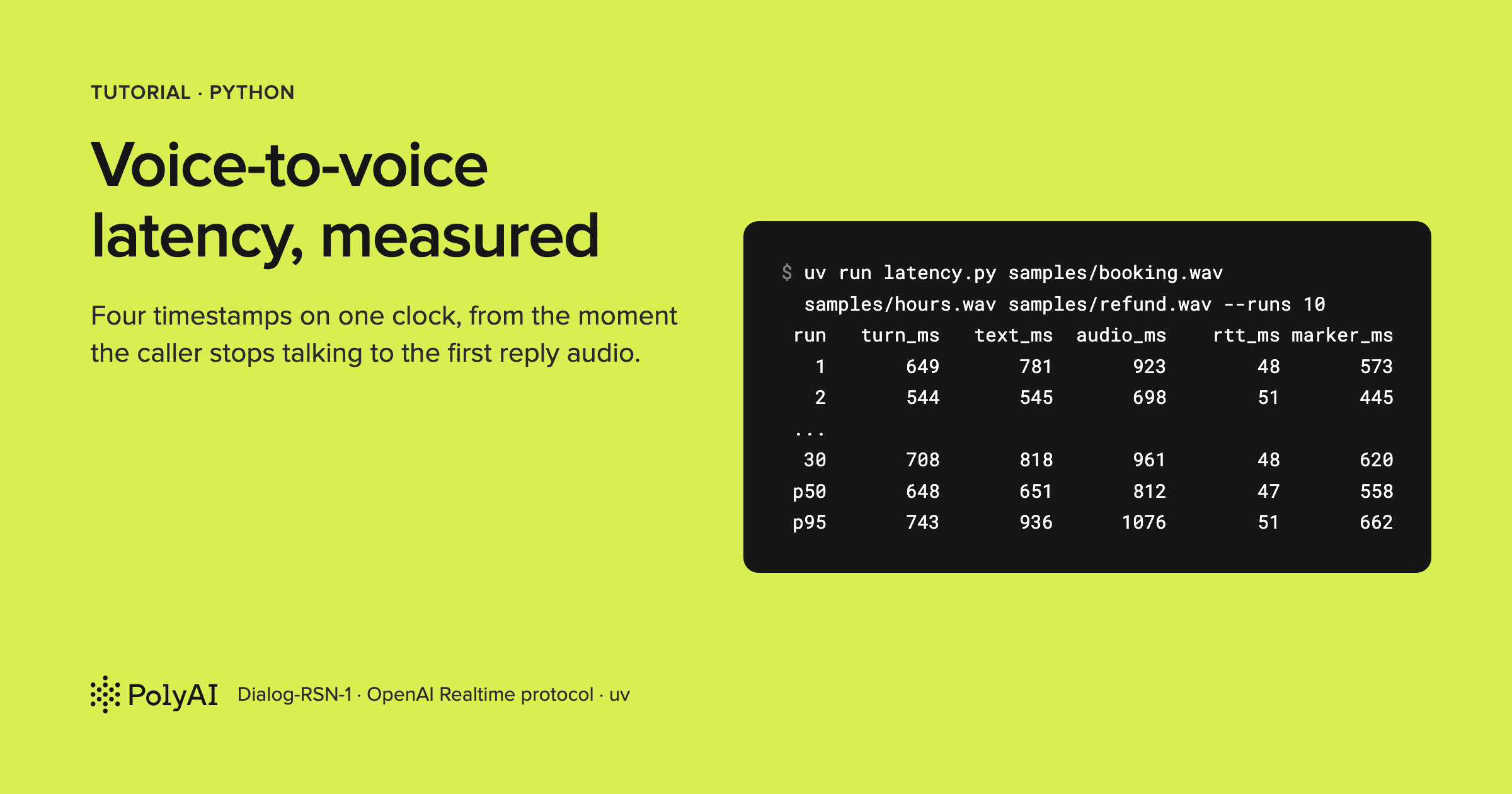
"It feels slow."
If you've built a voice agent, someone has said that to you. It's a fair complaint. But it isn't a number, so there's nothing to fix.
Slow where, though? The turn detection might be waiting too long. The model might be thinking. The voice might start late. Or it's your Wi-Fi.
Until you can split one turn into those pieces, you're tuning by ear.
So I built a small Python tool to split them. It plays a recorded caller into a realtime voice API at real speed and stamps four moments on one clock: when the caller stopped talking, when the server confirmed the turn, and when the first reply text and the first reply audio arrived. Run it twenty or thirty times and it prints the median and the 95th percentile of each.
In this post I'll walk you through how it works, then run it against PolyAI's Dialog-RSN-1 API (the one I work on) and show you what the numbers said.
The first thing the tool taught me was where not to start the clock.
The obvious choice is the server's own end-of-speech marker. On Dialog-RSN-1, that marker landed about 560 ms after the caller's last word. Time from it and you hide most of the wait.
Code: pmckeetx/voice-to-voice-latency
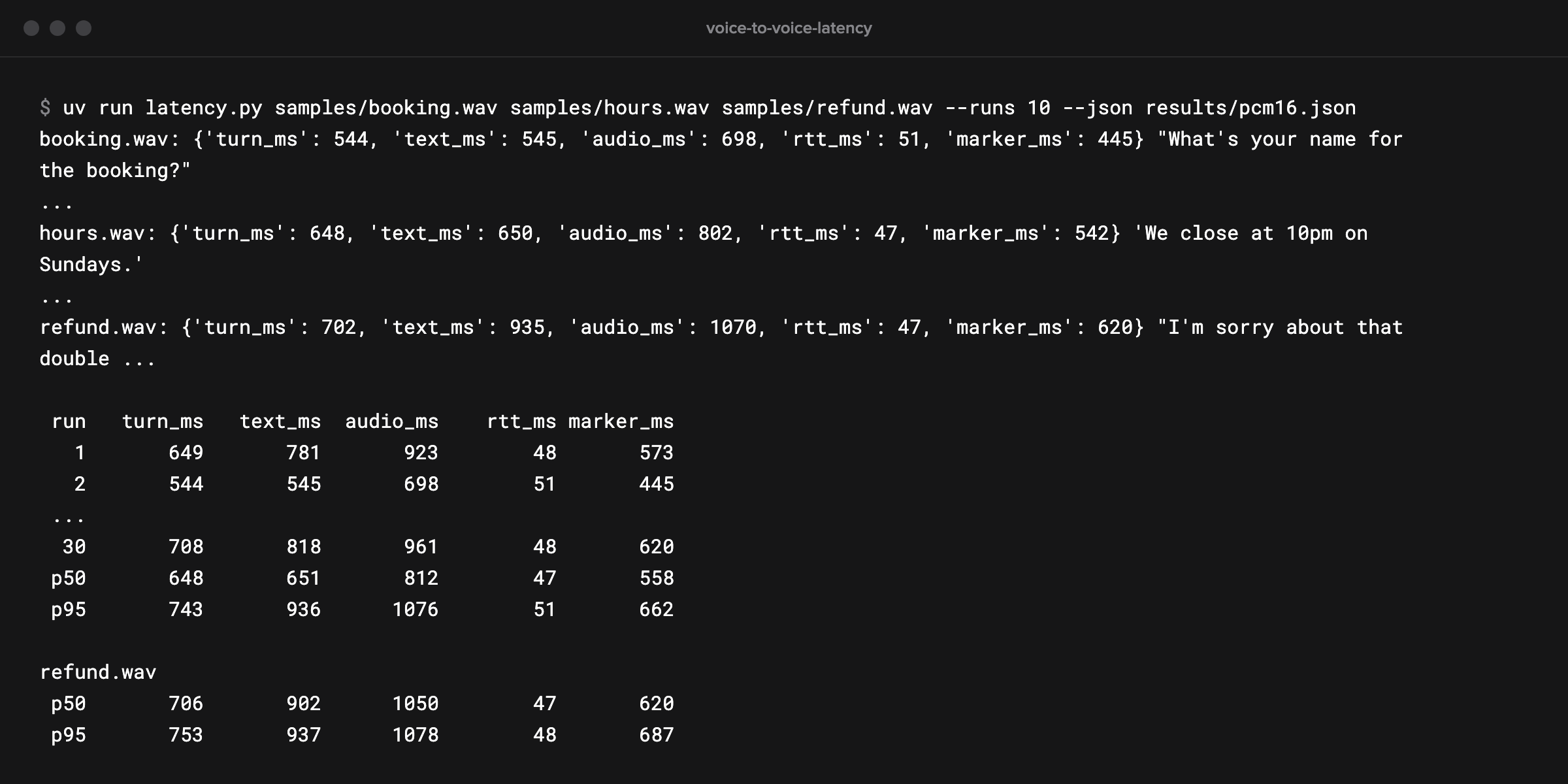
What you'll build
By the end you'll have latency.py, a command-line tool of about 200 lines. It streams a WAV file of a caller in 20 ms frames, on the same schedule a microphone would.
When the caller stops, it keeps sending silence. That's what a real line does, and as you'll see, the server depends on it.
It times every turn on your side of the connection, so the numbers include the network your callers' audio crosses. Before each turn it pings the server, which tells you how much of the wait is network and how much is server. Every turn also goes to JSON, so you can graph it or diff two runs.
The repo comes with three recorded callers, at 16 kHz and 8 kHz, plus offline tests that need no key and a live test.
How it works
Here's one turn, drawn from the medians of the runs later in this post:
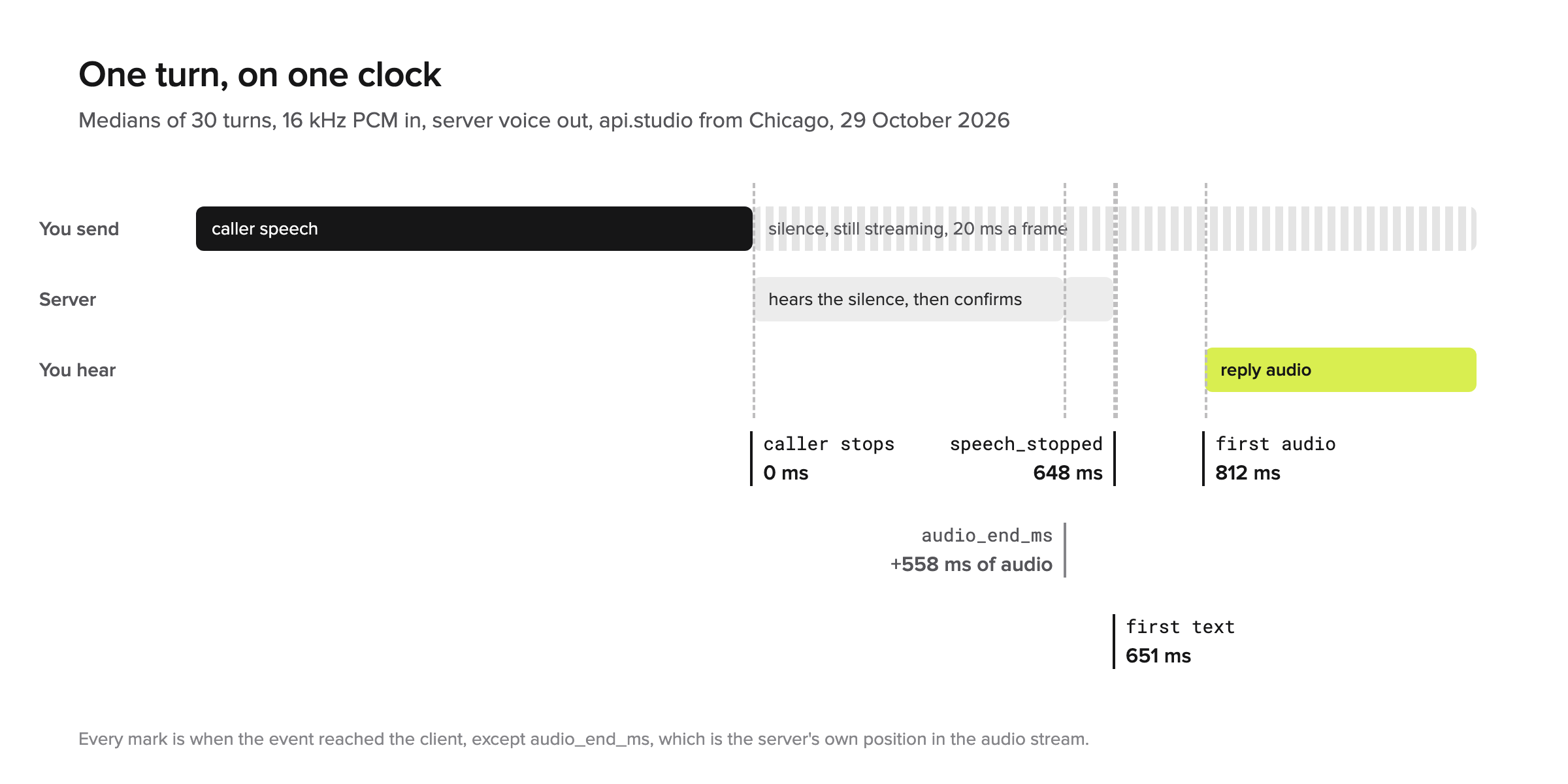
The clock starts when the caller stops speaking. I was strict about that.
It doesn't start when your WAV file ends: recordings carry a tail of silence. And it doesn't start when the server says the speech ended: that marker comes hundreds of milliseconds late.
The tool finds the last sample that holds speech and starts the clock when the frame containing it leaves your machine.
From there, three things have to happen before anyone hears a reply.
First, the server has to decide the caller is done. A pause and the end of a turn sound the same at first, so it has to hear some silence before it commits. That gap is turn_ms.
On Dialog-RSN-1, a voice activity detector (VAD) proposes the boundary and the model confirms it. So input_audio_buffer.speech_stopped reports the model's judgment, not the detector's.
Then the model writes the first words of the reply (text_ms), and the server's text-to-speech voices them (audio_ms). Dialog-RSN-1's API speaks the reply by default, so the first audio arrives on the same WebSocket as everything else.
Measuring another API?The tool speaks the OpenAI Realtime protocol, so you can point it at other APIs that do, with two caveats. The clips go as 16 kHz PCM, so an API that documents 24 kHz input needs them resampled. And where
speech_stoppedis a voice activity detector's raw signal, not a confirmed turn,turn_msmeasures something different.
Why a recording and not a microphone? A microphone gives you a different caller every run. A recording says the same words at the same pace every time, so the only thing that changes is the system you're measuring.
Prerequisites
You'll need Python 3.12 or later and uv, which installs the exact dependency versions from the lockfile.
You'll also need a Dialog-RSN-1 API key. Sign in at studio.poly.ai and create one in the API Keys tab.
Sessions bill per second of connection plus tokens, at $0.02 a connected minute at the time of writing (see limits and pricing). Each measured turn is a session of about 10 seconds, so a run of 30 is about five connected minutes, or about 10 cents plus tokens.
Set up the project
Clone the repo and move into it:
git clone https://github.com/pmckeetx/voice-to-voice-latency.git
cd voice-to-voice-latency
Copy the example environment file:
cp .env.example .env
Then paste your key after POLY_API_KEY=. Here are the first lines of the file:
# Your Dialog-RSN-1 API key: sign in at https://studio.poly.ai and create one in the API Keys tab.
# A key already set in your shell wins over this file.
POLY_API_KEY=

# Optional: the full endpoint to measure. Defaults to wss://api.studio.poly.ai/v1/realtime.
# DIALOG_REALTIME_URL=
DIALOG_REALTIME_URL is the endpoint the tool measures. Leave it unset for Dialog-RSN-1's public API, or point it at any server that speaks the OpenAI Realtime protocol.
Watch outA
POLY_API_KEYalready exported in your shell beats the one in.env. If you get a401with a key you know is good, runecho $POLY_API_KEYandunset POLY_API_KEY.
Install the dependencies:
uv sync
uv sync creates a virtual environment in .venv and installs websockets and python-dotenv, plus pytest and pytest-asyncio for the tests. That's all the tool needs.
Step 1: Find where the speech ends
The first job is knowing exactly when the caller stopped. Here's the property that works it out, from audio.py:
    @property
    def speech_end(self) -> float:
        """Seconds from the start of the clip to the last sample that holds speech."""
        for i in range(len(self.samples) - 1, -1, -1):
            if abs(self.samples[i]) > SPEECH_LEVEL:
                return (i + 1) / self.rate
        return 0.0
It walks back from the end of the clip to the last sample louder than SPEECH_LEVEL. That's 330, about -40 dBFS: well above the noise floor of a clean recording, and well below quiet speech.
Why the end of the speech and not the end of the file? Because they're in different places.
The 16 kHz sample clips end 60 to 160 ms after their last word. Count from the end of the file and every one of those milliseconds shows up as latency the server never caused.
The rest of audio.py loads a 16-bit mono WAV, cuts it into frames and encodes G.711 μ-law for the phone-line test. Nothing in it will surprise you, so I'll skip it.
Step 2: Open a session and pick the input format
Each measured turn gets a fresh session. That's deliberate: one turn's history can't speed up or slow down the next. Here's the start of measure() in latency.py:
    async with websockets.connect(url, additional_headers={"Authorization": f"Bearer {key}"}) as ws:
        assert json.loads(await ws.recv())["type"] == "session.created"
        await ws.send(json.dumps({"type": "session.update", "session": {
            "type": "realtime",
            "instructions": INSTRUCTIONS,
            "output_modalities": ["text"] if text_only else ["audio"],
            "audio": {"input": {
                "format": session_format(clip.rate),
                "turn_detection": {"type": "server_vad", "create_response": True},
            }},
        }}))
        while json.loads(await ws.recv())["type"] != "session.updated":
            pass
instructions is the system prompt. Mine makes the agent a restaurant receptionist who answers in one short sentence. A short answer doesn't change when the reply starts, but it keeps each session short, and that keeps the bill down.
output_modalities is ["audio"] unless you pass --text. With audio, the server voices the reply, so you're measuring what a caller would get. With text, you're measuring the model on its own.
turn_detection is server_vad with create_response: true. That's how most voice agents run: the server finds the end of the turn and starts the reply itself.
You may know timing fields such as silence_duration_ms from other APIs. Dialog-RSN-1 accepts them on a realtime session and ignores them (at the time of writing, October 2026), so there's nothing to tune here.
The tool waits for session.updated before it sends any audio, so the format is in place for the first frame.
The format comes from a small table at the top of latency.py:
FORMATS = {
    # name: (session format, the clip rate it needs, frame encoder)
    "pcm16": (lambda rate: {"type": "audio/pcm", "rate": rate}, None, to_pcm16),
    "pcmu": (lambda rate: {"type": "audio/pcmu"}, 8000, to_pcmu),
}
pcm16 sends 16-bit PCM at whatever rate the clip has. The samples are 16 kHz, which Dialog-RSN-1 takes without resampling.
pcmu sends G.711 μ-law at 8 kHz. That's what a phone trunk or a Twilio media stream delivers, so it shows you what a phone line costs.
Step 3: Stream the caller at real speed
This is the step where most of the mistakes live, so let's go slowly. Here's stream() from latency.py:
async def stream(ws, clip: Clip, encode, turn: Turn, done: asyncio.Event):
    """Send the clip in 20 ms frames on a fixed schedule, then silence until the reply is in."""
    lead = frames(silence(clip.rate, LEAD_S), clip.rate, FRAME_MS)
    audio = lead + frames(clip.samples, clip.rate, FRAME_MS)
    last_speech = len(lead) + int(clip.speech_end * 1000) // FRAME_MS
    turn.speech_end_audio_ms = (LEAD_S + clip.speech_end) * 1000
    quiet = silence(clip.rate, FRAME_MS / 1000)

    start = time.perf_counter()
    i = 0
    while not done.is_set():
        frame = audio[i] if i < len(audio) else quiet
        await asyncio.sleep(max(0.0, start + i * FRAME_MS / 1000 - time.perf_counter()))
        await ws.send(json.dumps({
            "type": "input_audio_buffer.append",
            "audio": base64.b64encode(encode(frame)).decode(),
        }))
        if i == last_speech:
            turn.speech_end = time.perf_counter()
        i += 1
        if i * FRAME_MS / 1000 > LEAD_S + clip.seconds + MAX_WAIT_S:
            break
I want to point out three choices in this function.
First, frame i goes out at start + i * 20 ms, worked out from the start. The loop doesn't sleep 20 ms after each send. That version drifts, because every send takes a little time, and after a few seconds your audio clock and the server's disagree.
Second, the clock starts right after the frame holding the last of the speech is sent. That frame can carry up to 20 ms of audio past the last word, so the numbers err slightly high. For a latency tool, high is the right way to be wrong.
Third, the loop keeps sending silent frames after the clip runs out, until the listener sets done. A caller's line doesn't go quiet when they stop talking. It carries silence, and the server needs to hear that silence to know the turn is over.
Watch outIf you stop streaming when the file ends, no reply ever comes. The server can't confirm a turn it hasn't heard end, and a client that stops sending looks idle, not quiet.
Two constants finish it off. LEAD_S puts half a second of silence before the caller speaks, so the detector hears the start of the speech cleanly. MAX_WAIT_S gives up on a turn that gets no reply after 15 seconds.
Step 4: Stamp the events on the same clock
While stream() sends, listen() reads. Here it is, from latency.py:
async def listen(ws, turn: Turn, done: asyncio.Event):
    """Stamp the first of each event we care about, until the reply is done."""
    async for raw in ws:
        now = time.perf_counter()
        event = json.loads(raw)
        kind = event["type"]
        if kind == "input_audio_buffer.speech_stopped" and turn.speech_stopped is None:
            turn.speech_stopped, turn.audio_end_ms = now, event.get("audio_end_ms")
        elif kind in ("response.output_audio_transcript.delta", "response.output_text.delta"):
            turn.first_text = turn.first_text or now
            turn.reply += event.get("delta", "")
        elif kind == "response.output_audio.delta":
            turn.first_audio = turn.first_audio or now
        elif kind == "response.done":
            break
        elif kind == "error":
            raise RuntimeError(event["error"].get("message", event["error"]))
    done.set()
The time is taken the moment a message arrives, before it's parsed, so JSON decoding doesn't count against the server.
Both tasks read time.perf_counter(). It's a monotonic clock, so a network time update can't move it in the middle of a run.
Text arrives as response.output_audio_transcript.delta when the server is voicing the reply, and as response.output_text.delta when it isn't. The listener takes whichever comes.
Audio arrives as response.output_audio.delta, base64 PCM at 24 kHz. The listener keeps the first of each and stops at response.done.
It also keeps audio_end_ms from speech_stopped. That's where the server says the speech ended, counted in milliseconds of audio it has received. Hold on to that one, because it explains most of the wait.
Then the Turn turns the stamps into milliseconds after the end of the speech. From latency.py:
    def ms(self, mark: float | None) -> float | None:
        if mark is None or self.speech_end is None:
            return None
        return round((mark - self.speech_end) * 1000)

    def row(self) -> dict:
        marker = None
        if self.audio_end_ms is not None and self.speech_end_audio_ms is not None:
            marker = round(self.audio_end_ms - self.speech_end_audio_ms)
        return {
            "turn_ms": self.ms(self.speech_stopped),
            "text_ms": self.ms(self.first_text),
            "audio_ms": self.ms(self.first_audio),
            "rtt_ms": round(self.rtt * 1000),
            "marker_ms": marker,  # how far past the real end of the speech audio_end_ms landed
        }
A missing event stays None and never becomes a zero, so a turn that got no audio can't drag the median down.
marker_ms is the one column that isn't on the clock. Both of its sides are in audio time.
audio_end_ms counts the milliseconds of audio the server has received, and stream() records where the speech ended in that same stream (speech_end_audio_ms: the half-second lead plus the clip's speech_end). Subtract one from the other and you get how far past the caller's last word the server put its end-of-speech marker.
Step 5: Separate the network with a ping
Every number so far includes the trip from your machine to the server and back. I wanted to know how big that was, so measure() sends a WebSocket ping before streaming:
        turn = Turn()
        pong = await ws.ping()
        sent = time.perf_counter()
        await pong
        turn.rtt = time.perf_counter() - sent
ws.ping() sends a ping frame and returns a future that resolves when the pong comes back. The round trip lands in the rtt_ms column.
Here's how the network gets into every number. The clock starts when the last frame leaves your machine. That frame takes half a round trip to reach the server, and each event takes the other half to come back.
So every number carries about one full round trip. If rtt_ms is big, where your callers are will move the numbers more than any setting you can change.
Step 6: Summarize with percentiles
One turn tells you nothing, because latency has a tail. The tool runs each clip --runs times, one session at a time, and then summarizes. From latency.py:
def percentile(values: list[float], p: int) -> float:
    if len(values) == 1:
        return values[0]
    return statistics.quantiles(values, n=100, method="inclusive")[p - 1]
statistics.quantiles with n=100 returns the 99 cut points between percentiles. method="inclusive" treats your runs as the whole population, not a sample, which is what you want for "the slowest 5 percent of what I saw".
With 30 runs, the 95th percentile falls between the second- and third-slowest turns. Treat it as a rough tail, not a guarantee, and run more if the tail is what you care about.
The table prints these over every turn, then again for each clip. I added the per-clip rows once I saw that one slow caller can own the whole tail. From report() in latency.py:
    percentiles(rows)
    if len(set(clips)) > 1:
        for name in dict.fromkeys(clips):
            print(f"\n{name}")
            percentiles([r for r, c in zip(rows, clips) if c == name])
dict.fromkeys keeps the clips in the order they ran. With a single clip, the per-clip block would repeat the totals, so it's skipped.
Run it
Now the good part. Here's the run this post's numbers come from: the three sample callers, ten sessions each, saved to JSON:
uv run latency.py samples/booking.wav samples/hours.wav samples/refund.wav --runs 10 --json results/pcm16.json
booking.wav: {'turn_ms': 649, 'text_ms': 781, 'audio_ms': 923, 'rtt_ms': 48, 'marker_ms': 573} "I'm sorry, I can't ...
booking.wav: {'turn_ms': 544, 'text_ms': 545, 'audio_ms': 698, 'rtt_ms': 51, 'marker_ms': 445} "What's your name for the booking?"
...
hours.wav: {'turn_ms': 648, 'text_ms': 650, 'audio_ms': 802, 'rtt_ms': 47, 'marker_ms': 542} 'We close at 10pm on Sundays.'
...
refund.wav: {'turn_ms': 702, 'text_ms': 935, 'audio_ms': 1070, 'rtt_ms': 47, 'marker_ms': 620} "I'm sorry about that double charge. ...

 run   turn_ms   text_ms  audio_ms    rtt_ms marker_ms
   1       649       781       923        48       573
   2       544       545       698        51       445
 ...
  30       708       818       961        48       620
 p50       648       651       812        47       558
 p95       743       936      1076        51       662

booking.wav
 p50       563       564       722        47       493
 p95       634       707       854        51       559

hours.wav
 p50       648       650       804        47       542
 p95       715       717       895        51       627

refund.wav
 p50       706       902      1050        47       620
 p95       753       937      1078        48       687
Each line is one turn: the five numbers and what the agent said. Then comes the table, with the median (p50) and the 95th percentile (p95) over all 30 turns, and the same two rows for each caller. I've trimmed long replies with ....
I ran this on 29 October 2026 against wss://api.studio.poly.ai/v1/realtime, from a Mac in the US Midwest, with 30 sessions one after another. From the moment the caller stopped talking, the first audio of the reply reached my Mac in 812 ms at the median and 1,076 ms at the 95th percentile.
So where did the time go?
Most of it went on the turn decision. The median turn_ms was 648 ms, and marker_ms shows what's inside it.
The server put its end-of-speech marker 445 to 716 ms into the silence after the caller's last word, 558 ms at the median.
speech_stopped reached me a median 82 ms after that point (61 to 106 ms). So the bulk of the gap is silence the server listens to before it commits to the end of the turn. Little of it is computation.
Watch out
audio_end_msisn't where the caller stopped talking. It's where the server put the end of the turn, about 560 ms of silence later in these runs. Start your clock from it and you'll hide most of the wait.
The first text was right behind the turn. On the booking and hours callers, it arrived 1 to 2 ms after speech_stopped at the median.
That's by design. Dialog-RSN-1 confirms the end of the turn as the first thing it emits in the generation that becomes the reply, so there's no second step to wait for.
The refund caller was the exception. Its first text came a median 170 ms after the turn. The tool can't see inside the model, but the likely reason is that Dialog-RSN-1 decides for each turn whether it needs thinking time first, so a turn like that can start later.
That one caller is also most of the tail. The pooled 95th percentile, 1,076 ms, is the refund caller's own (1,078 ms).
The booking and hours callers had their first audio at 722 and 804 ms at the median, and stayed under 900 ms at their 95th percentiles. That's why the tool prints each clip on its own.
The voice added about 150 ms. The first audio arrived 135 to 191 ms after the first text, 151 ms at the median: the server's text-to-speech getting the first words out.
And the network held still, with pings of 45 to 51 ms. That's roughly the 47 ms round trip every number carries: the last frame's trip to the server and the event's trip back.
Next, I sent the same callers the way a phone line sends them, as G.711 μ-law at 8 kHz:
uv run latency.py samples/booking-8k.wav samples/hours-8k.wav samples/refund-8k.wav --format pcmu --runs 10
 run   turn_ms   text_ms  audio_ms    rtt_ms marker_ms
   1       612       613       899        49       444
   2       607       608       735        48       444
 ...
  30       718       891      1042        50       540
 p50       728       740       896        47       559
 p95       780       963      1112        50       646
...
I've trimmed the per-turn lines and the per-clip rows here.
This was the second run, straight after the first: 30 more sessions, same host, same Mac. The first audio arrived in 896 ms at the median and 1,112 ms at the 95th percentile. That's 84 ms and 36 ms behind the 16 kHz run.
What caught my eye was where the difference sits. The end-of-speech marker landed in the same place, 559 ms into the silence at the median against 558.
But speech_stopped arrived a median 166 ms after it, against 82 ms at 16 kHz. An earlier run the same afternoon showed the same split (162 ms against 79).
The voice still followed the first text by a median 154 ms.
I'd take that gap as a rough size, not a verdict on phone audio. The 8 kHz clips are separate renders of the same lines, so their pauses differ a little from the 16 kHz ones. And 30 turns can't resolve a difference this small.
What it does tell you is that μ-law at 8 kHz didn't change the shape of the turn. If your callers come in over the phone, record a few calls from your own trunk and run them through. Then you'll know for your line.
Test it without a key
You don't need a key to check the tool itself.
The offline tests run against a fake server in tests/fake_server.py, which answers on a schedule counted in audio, like the real one. It notices where the speech stops and sends speech_stopped only after 500 ms more audio has arrived, then text 100 ms later and audio 100 ms after that. Run them:
uv run pytest
The end of the output, with pytest's header lines trimmed:
collected 10 items / 2 deselected / 8 selected

tests/test_latency.py ........                                           [100%]

======================= 8 passed, 2 deselected in 8.68s ========================
The main test checks that the tool measures that schedule back, within 60 ms, in both formats. Another checks that the tool keeps streaming silence after the clip ends, because that's the bug that makes a real server go quiet. A third checks that each clip gets its own percentiles.
The two deselected tests are the live ones: POLYAI_LIVE=1 uv run pytest -m live runs one real turn in each format.
Troubleshooting
| Symptom | Likely cause | Fix |
|---|---|---|
websockets.exceptions.InvalidStatus: server rejected WebSocket connection: HTTP 401 | Wrong key, a shell POLY_API_KEY overriding .env, or a key for another host | unset POLY_API_KEY and check the key in .env; for a key from another host, set DIALOG_REALTIME_URL to that host |
TimeoutError and no numbers | No reply: the turn never ended | Use the tool's stream(); if you changed it, keep sending silence after the clip |
samples/booking.wav is 16000 Hz; --format pcmu needs 8000 Hz | μ-law is fixed at 8 kHz | Use the -8k clips, or ffmpeg -i in.wav -ar 8000 -ac 1 out.wav |
needs 16-bit mono PCM | A stereo, 24-bit or compressed file | ffmpeg -i in.wav -ac 1 -c:a pcm_s16le out.wav |
rtt_ms jumps around and so does everything else | Wi-Fi or a busy network | Use a wired connection, or run from a cloud machine near your callers |
HTTP 429 on connect (session_limit_reached) | Another app or another run is using your account's sessions | Stop the other run; the tool itself opens one session at a time |
Before you ship
This tool measures to the first audio received, not the first audio heard. Your client adds its own playback buffer, and the caller's phone or speaker adds more. Measure your playback path once and add it on.
Measure from where your callers are. My runs went from a Mac in the Midwest. A server in the same region as the API will see a smaller rtt_ms, and a caller on another continent a bigger one.
And measure your own agent, not mine. A long system prompt and a long conversation change how much work happens after the turn ends. Put your instructions in measure(), and record a few of your real callers (with their permission) before you trust any number.
One gap to know about: the tool doesn't handle tool calls. It stops at the first response.done and never sends a function_call_output, so a turn that calls a tool is measured only up to the call. Timing a tool round trip needs that added.
Last, watch the bill. Each turn is a session of about 10 seconds with server voice on, so a run of 100 turns is about 16 connected minutes.
Wrapping up
When I started, all I had was "it feels slow". Now I can say where a turn's time goes.
On this setup, most of it was the server listening to silence before it called the end of the turn. The model's first words came right behind that, the voice took about 150 ms more, and the network took one round trip.
So if I wanted a faster agent, I'd look at the turn decision first. In these runs it was most of the wait.
Your numbers will be different, and that's why the tool exists. Record a handful of your own callers and run them through it, or send the same callers as μ-law from your own phone trunk and compare. The Dialog-RSN-1 overview explains how turn-taking works, and the API reference lists every event the tool listens for.
The code is at pmckeetx/voice-to-voice-latency. If you measure something interesting with it, I'd love to see the numbers.

Peter McKee
Hands-on technical leader architecting and shipping production AI systems, with three decades of engineering experience across IC, architect, and director-level roles at Docker, JFrog, AssemblyAI, and Sonar. Currently building ShrikeDB, a Redis-compatible in-memory database in Rust.
More from Peter McKee →How to build a voice agent using LangChain and PolyAI's realtime voice model
Handle barge-in without your voice agent repeating itself
Related posts
Handle barge-in without your voice agent repeating itself
October 29, 2026 • 20 min read
How to build a voice agent using LangChain and PolyAI's realtime voice model
October 23, 2026 • 27 min read
Add a Voice Assistant to Any Website with Dialog-RSN-1
October 22, 2026 • 18 min read