Build an outbound voice agent that waits on hold
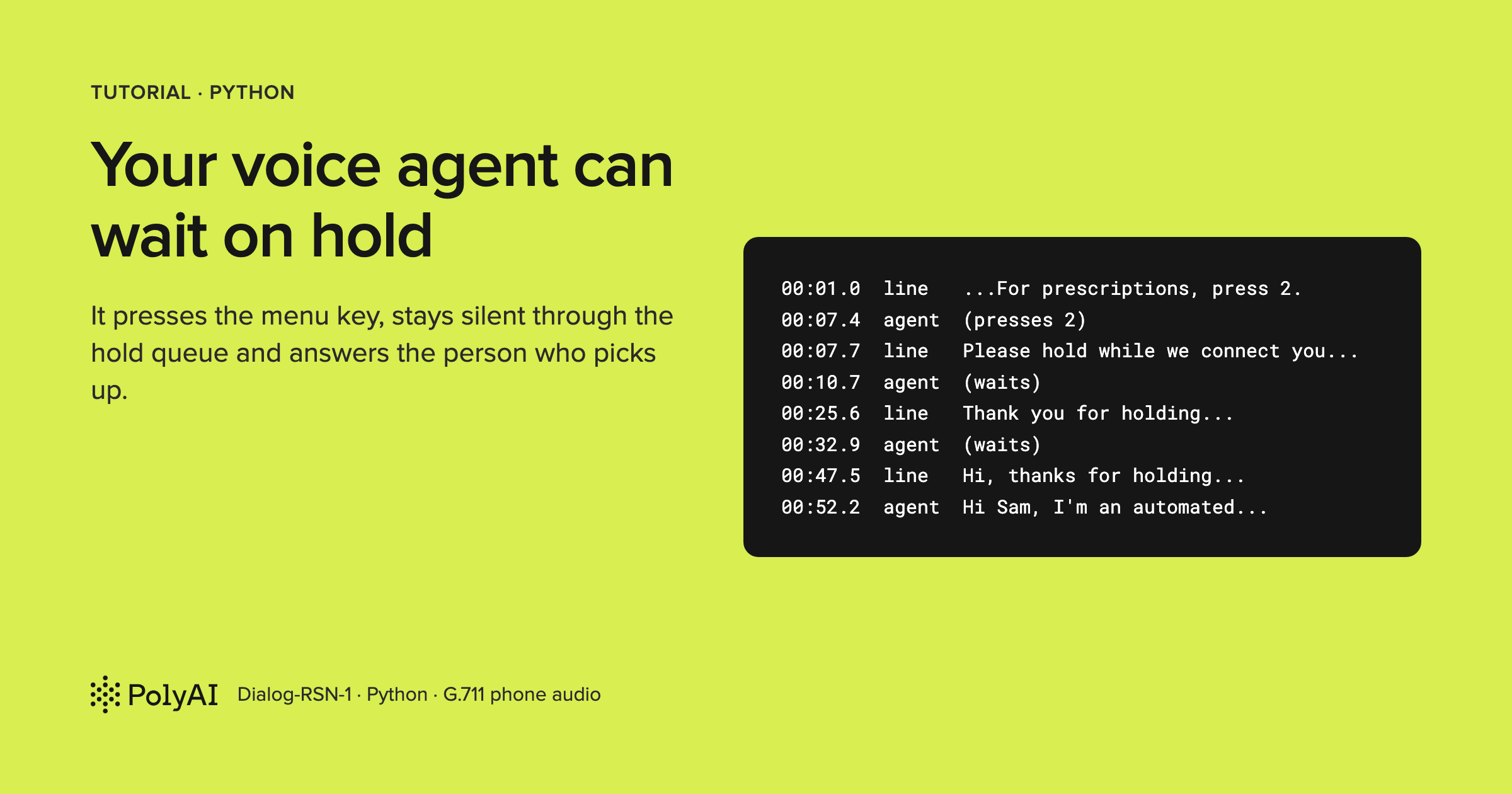
Most voice agents spend their lives waiting for the phone to ring. They pick up, greet a caller, and respond to incoming questions. When you flip that equation and have the agent place the call, everything changes. The opening minute of an outbound call is an unforgiving proving ground.
Before a human ever answers, an outbound agent has to survive an automated gauntlet: an interactive voice response (IVR) menu demanding a keypress, a canned recording asking you to hold, thirty seconds of looping hold music, another announcement insisting your call matters, and then (abruptly, unpredictably) a live human being saying hello. An agent programmed to answer every sound it hears will eagerly start chatting with the hold recording. Meanwhile, an agent told simply to wait for a human usually ends up needing brittle classifiers or dedicated speech-detection heuristics just to tell the difference between hold music and a real person.
In this post, we'll build a Python agent using PolyAI's Dialog-RSN-1 API that dials a pharmacy to verify whether a patient's prescription is ready. It navigates the phone tree by pressing 2, sits patiently through the hold music without uttering a syllable, and then steps into the conversation within roughly a second of the pharmacist finishing his greeting.
The surprising part is what we don't need. There are no hold-music detectors, no custom voice-activity filters, and no heuristic human-detection scripts. Because Dialog-RSN-1 hears the raw audio stream directly, it can perceive the difference between hold music, canned recordings, and live speech on its own. To make it work, the agent only needs two architectural choices: a deliberate way to answer a conversational turn by choosing silence, and an event loop that knows when not to ask the model to speak.
Code: pmckeetx/on-hold-voice-agent
To run this, you don't even need a telephony account. The repository includes a simulated pharmacy line that streams authentic 8 kHz phone-grade audio over real-time async loops and records both sides of the exchange so you can evaluate the call after it finishes.
What you'll build
In about 180 lines of Python, you'll create an agent representing a patient named Jane Porter. It calls "Riverside Pharmacy" (a local test environment configured with an authentic hold queue), presses 2 for the prescription desk, endures the wait, introduces itself as an automated caller, spells Jane's name on request, holds while the pharmacist checks the shelf, and hangs up once it has the answer.
Here is an actual run against the public API, showing timestamps on the left and agent actions in brackets:
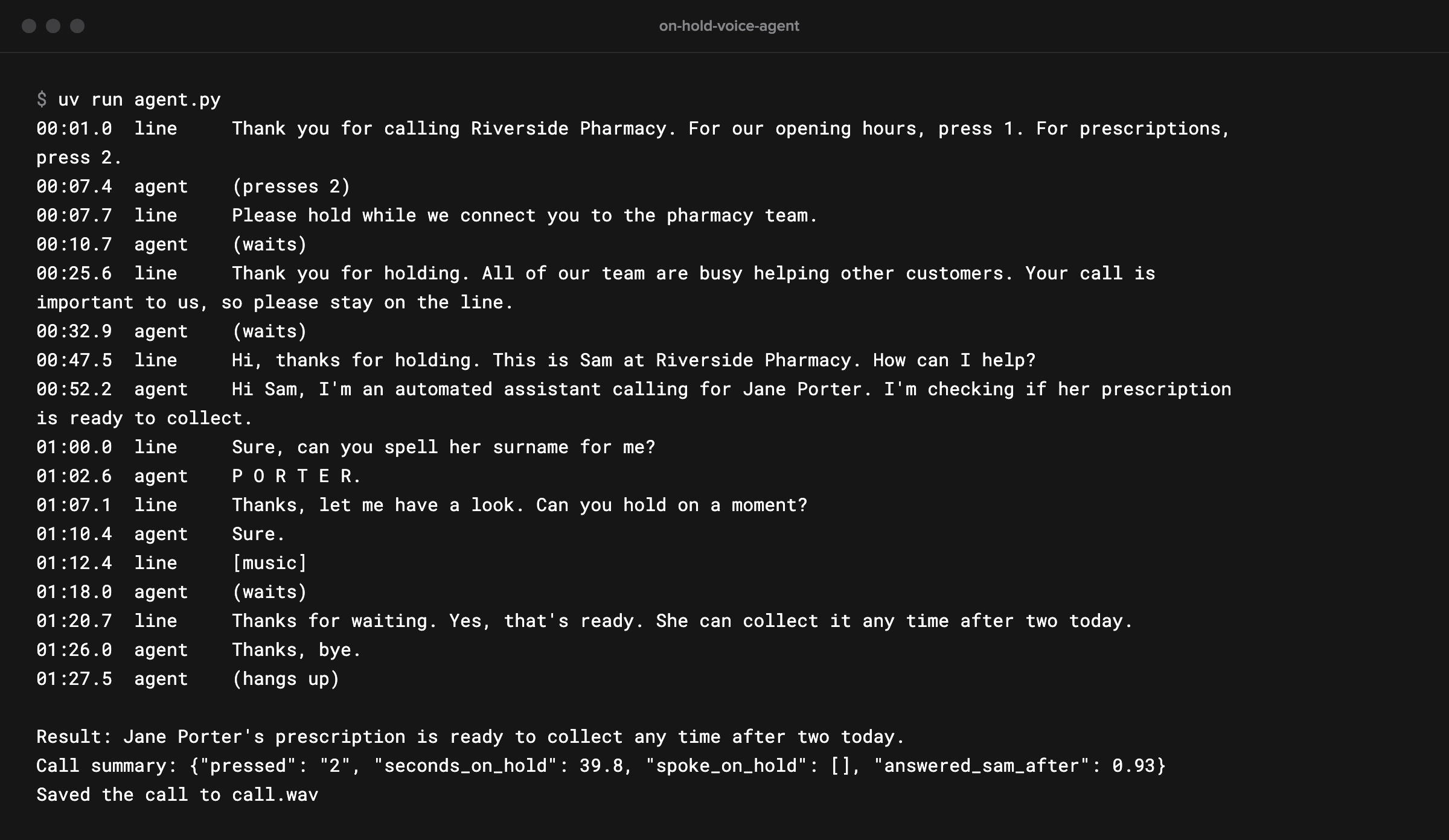
Between pressing 2 and Sam picking up the phone, forty seconds pass. During that entire stretch, the agent intervenes exactly twice, calling wait once for each automated announcement, while thirty straight seconds of hold music pass without triggering an accidental turn.
How it works
Rather than interfacing directly with carrier trunks, the agent interacts with an abstraction called the line. The line yields incoming audio in 20 ms frames, accepts outgoing audio frames to play back to the caller, and receives DTMF keypresses. While our repo uses a scripted simulation, this abstraction mirrors the media stream you would get from a provider like Twilio or Telnyx on a real call.
Text
+---------------+   Audio frames (20 ms, 8 kHz μ-law)   +-------------------+
|               | ------------------------------------> |                   |
| Phone Line /  |                                       | Dialog-RSN-1 API  |
| Pharmacy Mock | <------------------------------------ |                   |
|               |   Agent voice (24 kHz PCM)            +-------------------+
+---------------+                                                 |
        ^                                                         |
        |                  Tool calls: wait / press_keys / end    |
        +---------------------------------------------------------+
Every millisecond of sound coming down the line goes directly to Dialog-RSN-1, music included. A server-side voice activity detector flags candidate speech boundaries, the model validates whether a meaningful conversational turn occurred, and the API generates a response. Because canned announcements are processed as turns, and because the model recognizes them as recordings, it can decide to execute a tool rather than speak over them.
This brings us to the three tools our agent relies on: wait (which does nothing), press_keys (for phone menus), and end_call (which says goodbye and terminates the connection). Crucially, whenever the agent triggers one of these tools, our client reports the execution result back to the server without sending a response.create event. The agent should only speak when something new happens on the line, rather than speaking just because a tool finished executing.
Prerequisites
You'll need Python 3.13 and uv to manage your environment cleanly against the lockfile. You will also need a Dialog-RSN-1 API key from the API Keys tab at studio.poly.ai. No phone lines, Twilio credentials, or local microphones are required.
Set up the project
Clone the repository and move into the workspace:
Terminal
git clone https://github.com/pmckeetx/on-hold-voice-agent.git
cd on-hold-voice-agent
Next, initialize your environment file:
Terminal
cp .env.example .env
The template is straightforward:
Text
# Your Dialog-RSN-1 API key: sign in at https://studio.poly.ai and create one in the API Keys tab.
POLY_API_KEY=

# Optional: the full realtime endpoint. Defaults to wss://api.studio.poly.ai/v1/realtime.
# DIALOG_REALTIME_URL=
Add your API key after POLY_API_KEY=. You can leave DIALOG_REALTIME_URL commented out unless your key belongs to a dedicated regional endpoint. If you have POLY_API_KEY exported in your shell environment, that value will take precedence automatically.
Install the locked dependencies:
Terminal
uv sync
Text
Using CPython 3.13.15
Creating virtual environment at: .venv
Resolved 11 packages in 1ms
Installed 9 packages in 25ms
...
 + numpy==2.5.4
...
 + python-dotenv==1.2.4
 + websockets==17.4
Behind the scenes, uv sync builds the virtual environment inside .venv and pins websockets, numpy, python-dotenv, pytest, and pytest-asyncio.
Step 1: Meet the pharmacy line
The file line.py simulates the remote side of the conversation. Most of it handles foundational telephony plumbing: converting audio to 8-bit G.711 μ-law, pacing packets in real time, injecting DTMF tones, and writing the final mixed audio to call.wav.
The core narrative of the call lives inside its script coroutine, defining the obstacle course our agent has to navigate:
Python
    async def script(self):
        await asyncio.sleep(0.5)
        for _ in range(3):
            await self.say("menu")
            key = await self.key(timeout=6)
            if key == "2":
                break
            if key == "1":
                await self.say("hours")
        await self.say("connecting")
        await self.music(self.hold_seconds * 0.5)
        await self.say("still-holding")
        await self.music(self.hold_seconds * 0.5)
        await self.say("sam-hello")
        await self.reply(timeout=10)
        await self.say("sam-spell")
        await self.reply(timeout=10)
        await self.say("sam-check")
        await self.reply(timeout=3)
        await self.music(8)
        await self.say("sam-ready")
        await self.reply(timeout=10)
        await self.say("sam-bye")
        await asyncio.sleep(3)
        self.hang_up()
The script plays an IVR prompt giving the caller six seconds to respond, repeating up to three times before falling through to the queue automatically. Plenty of real retail IVRs do the same. Once through, it alternates hold music with periodic status announcements across a duration controlled by --hold (defaulting to 30 seconds).
When Sam picks up, reply() mimics human conversational timing: it waits for the agent to finish talking and detects a natural one-second pause before responding. Notice Sam's sam-check prompt halfway through the dialog: he asks the caller to hold on, pauses for an acknowledgement, and puts the line back on hold for eight seconds of music before returning with the status.
To keep the design clean, our agent only touches this simulated telephony line through six clean methods: frames(), play(), clear(), press(), finish_playing(), and hang_up(). When migrating to production, these six methods are the only bridge you need to implement against your carrier's media stream.
Step 2: Write the instructions
Open agent.py. Right under the imports, the agent's behavior is anchored by system instructions designed for conversational patience:
Python
INSTRUCTIONS = """You are an assistant making a phone call on behalf of a patient, Jane Porter, date of birth
4 May 1982. You're calling Riverside Pharmacy to ask whether her prescription is ready to collect.

You'll often reach a phone menu or a hold queue before a person. Pick the menu option for prescriptions with
press_keys. While you're on hold, or hear hold music or a recorded message, call wait and say nothing. Never
talk to a recording.

When a person answers, tell them you're an automated assistant calling for Jane Porter, and why, in one or
two short sentences. Answer their questions about the patient. If they ask you to hold, say "Sure" and wait.
Once you have the answer, thank them and call end_call."""
The instructions break down into three distinct responsibilities:
- The Context: Who the agent is, who it represents, and what question needs an answer.
- The Queue Protocol: Every turn the server confirms gets a response, so when an announcement plays the model has to answer with something. The prompt names
waitas that answer, so it chooses the tool instead of speaking. Instructing it that recordings are not conversational partners prevents it from replying to greetings like "Your call is important to us." - The Human Interaction: Mandating that it identify itself as an automated caller immediately (essential for clarity and regulatory compliance), and teaching it how to respond gracefully when asked to hold mid-conversation.
Step 3: Give the agent a way to say nothing
Because real-time models are designed to respond when addressed, maintaining silence requires an explicit action. We provide that by defining our toolset:
Python
TOOLS = [
    {
        "type": "function",
        "name": "wait",
        "description": "Stay silent and keep listening. Call this instead of speaking whenever you're on hold, "
                       "or hear hold music, a recorded message, or silence on the line.",
        "parameters": {"type": "object", "properties": {}},
    },
    {
        "type": "function",
        "name": "press_keys",
        "description": "Press keys on the phone keypad, to choose an option in an automated phone menu.",
        "parameters": {
            "type": "object",
            "properties": {"digits": {"type": "string", "description": "The keys to press, like '2' or '1#'."}},
            "required": ["digits"],
        },
    },
Notice that wait takes zero parameters. Its sole purpose is to serve as a conversational no-op, allowing the model to register that it heard a turn without producing audio. The tool description mirrors the prompt instructions so the model's intent remains consistent across decision boundaries.
The menu tool, press_keys, takes arbitrary digit strings, letting the agent pass single numbers like "2" or multi-character sequences like "1#".
Finally, we define how the call concludes:
Python
    {
        "type": "function",
        "name": "end_call",
        "description": "Say goodbye and hang up, once you have the answer you called for.",
        "parameters": {
            "type": "object",
            "properties": {
                "result": {"type": "string", "description": "What you found out, in one sentence, for the patient."},
                "goodbye": {"type": "string", "poly_spoken": True,
                            "description": "A short goodbye to say before hanging up, like 'Thanks, bye.'"},
            },
            "required": ["result", "goodbye"],
        },
    },
]
The end_call schema uses a distinctive PolyAI capability: "poly_spoken": True. When Dialog-RSN-1 is asked to speak a parting phrase and then fire a termination tool, it says the phrase and stops, so the tool call never comes. Marking goodbye with poly_spoken instructs the engine to speak that string aloud concurrently with firing the tool, allowing the agent to bid farewell and trigger the tear-down logic in one cohesive step.
Step 4: Open the session with phone audio
The Caller class coordinates the WebSocket connection and the audio line. When the session initializes, its start() method establishes the session configuration:
Python
    async def start(self):
        await self.ws.recv()  # session.created
        await self.send({
            "type": "session.update",
            "session": {
                "type": "realtime",
                "instructions": INSTRUCTIONS,
                "tools": TOOLS,
                "audio": {"input": {"format": {"type": "audio/pcmu"}, "turn_detection": {"type": "server_vad"}}},
            },
        })
Configuring audio/pcmu informs the server that incoming packets will arrive as native 8 kHz G.711 μ-law, matching carrier stream standards and removing the need for local client-side resampling. Setting turn_detection to server_vad delegates speech boundaries to the server, with Dialog-RSN-1 acting as the arbiter of when a turn is genuinely complete.
Spoken replies return as 24 kHz raw PCM, ready for local conversion or playback.
Step 5: Stream the line, hold music and all
Streaming the incoming channel up to the model is remarkably compact:
Python
    async def stream_line(self):
        """Forward the other end of the call to Dialog-RSN-1, 20 ms at a time, hold music and all."""
        async for frame in self.line.frames():
            await self.send({"type": "input_audio_buffer.append", "audio": base64.b64encode(frame).decode()})
Each frame represents 20 ms of μ-law audio (160 bytes), encoded into base64 and pushed via an input_audio_buffer.append message.
It might seem tempting to mute or halt this loop while hold music plays to conserve bandwidth. Doing so, however, blinds the model: the server decides where a turn ends from the audio it receives, so it can only register the instant a person speaks if you keep streaming. Dropping the audio stream also trips the inactivity timeout: a connection that sends nothing for five minutes is closed with code 4408.
Step 6: Handle what comes back
The event listener processes incoming server packets, streaming outgoing audio into the phone line and handling interruptions:
Python
    async def listen(self):
        async for message in self.ws:
            event = json.loads(message)
            kind = event["type"]
            if kind == "response.output_audio.delta":
                self.started.setdefault(event["response_id"], time.monotonic())
                self.line.play(base64.b64decode(event["delta"]))
            elif kind == "input_audio_buffer.speech_started":
                self.started[event["item_id"]] = time.monotonic()
                self.line.clear()  # they're talking: stop any of our reply that hasn't played yet
            elif kind == "conversation.item.input_audio_transcription.completed":
                self.log("line", event["transcript"].strip(), self.started.get(event["item_id"]))
            elif kind == "response.output_audio_transcript.done":
                self.log("agent", event["transcript"], self.started.get(event["response_id"]))
When synthesized speech deltas arrive via response.output_audio.delta, they are pushed straight to the line's playback buffer. If the human begins speaking while the agent is talking, the server raises input_audio_buffer.speech_started. The agent immediately invokes self.line.clear(), wiping unplayed audio frames to execute an instant, natural barge-in.
Step 7: Answer each tool without asking for a reply
The second half of listen() handles tool invocations, and it implements the most important architectural pattern in the agent:
Python
            elif kind == "response.function_call_arguments.done":
                output = self.on_tool(event["name"], json.loads(event["arguments"] or "{}"))
                # Answer the call, but don't send response.create: the next thing on the line is the answer
                await self.send({"type": "conversation.item.create", "item": {
                    "type": "function_call_output", "call_id": event["call_id"], "output": json.dumps(output)}})
            elif kind == "error":
                self.log("error", event["error"].get("message", ""))
Standard real-time agent loops typically post a tool's output and immediately issue a response.create command so the model can acknowledge what happened. In an outbound hold workflow, that assumption falls apart:
- After calling
wait, requesting a response would force the model to speak to the hold queue. - After calling
press_keys, the expected follow-up is whatever prompt the IVR delivers next. - After calling
end_call, the conversation is finished.
By sending only the function_call_output without a trailing response.create, we record the event in history while leaving the floor open for the other side of the line to speak next.
The corresponding tool dispatch handlers keep state changes concise:
Python
    def on_tool(self, name: str, args: dict) -> dict:
        if name == "wait":
            self.log("agent", "(waits)")
            return {"status": "waiting"}
        if name == "press_keys":
            self.log("agent", f"(presses {args['digits']})")
            self.line.press(args["digits"])
            return {"pressed": args["digits"]}
        if name == "end_call":
            self.result = args["result"]
            self.hanging_up = asyncio.create_task(self.hang_up_after_goodbye())
            return {"status": "hanging up"}
        return {"error": f"no tool called {name}"}

    async def hang_up_after_goodbye(self):
        await asyncio.sleep(1.0)  # the goodbye is spoken alongside the call, so let the last of it arrive
        await self.line.finish_playing()
        self.log("agent", "(hangs up)")
        self.line.hang_up()
When ending the call, hang_up_after_goodbye runs as an independent async task. Because the goodbye message is being spoken alongside the tool call, this background task gives the final audio packets a second to flush down the line, waits for playback completion, and terminates the session cleanly without blocking the primary event loop.
Step 8: Place the call
Putting it all together, call() binds the WebSocket session, kicks off the listener, and streams audio until the call terminates:
Python
async def call(line) -> Caller:
    """Place the call: stream the line to Dialog-RSN-1 until one side hangs up."""
    key = os.environ.get("POLY_API_KEY")
    if not key:
        raise SystemExit("POLY_API_KEY isn't set. Copy .env.example to .env and add your key from studio.poly.ai.")
    async with websockets.connect(URL, additional_headers={"Authorization": f"Bearer {key}"}) as ws:
        caller = Caller(ws, line)
        await caller.start()
        listener = asyncio.create_task(caller.listen())
        await caller.stream_line()
        listener.cancel()
    return caller
The listener operates in the background while the audio stream occupies the foreground. As soon as either party hangs up, the audio stream completes, the listener is cleanly cancelled, and the execution summary returns.
Run it
With the pieces in place, execute the agent:
Terminal
uv run agent.py
Text
00:01.0  line     Thank you for calling Riverside Pharmacy. For our opening hours, press 1. For prescriptions, press 2.
00:07.4  agent    (presses 2)
00:07.7  line     Please hold while we connect you to the pharmacy team.
00:10.7  agent    (waits)
00:25.6  line     Thank you for holding. All of our team are busy helping other customers. Your call is important to us, so please stay on the line.
00:32.9  agent    (waits)
00:47.5  line     Hi, thanks for holding. This is Sam at Riverside Pharmacy. How can I help?
00:52.2  agent    Hi Sam, I'm an automated assistant calling for Jane Porter. I'm checking if her prescription is ready to collect.
01:00.0  line     Sure, can you spell her surname for me?
01:02.6  agent    P O R T E R.
01:07.1  line     Thanks, let me have a look. Can you hold on a moment?
01:10.4  agent    Sure.
01:12.4  line     [music]
01:18.0  agent    (waits)
01:20.7  line     Thanks for waiting. Yes, that's ready. She can collect it any time after two today.
01:26.0  agent    Thanks, bye.
01:27.5  agent    (hangs up)

Result: Jane Porter's prescription is ready to collect any time after two today.
Call summary: {"pressed": "2", "seconds_on_hold": 39.8, "spoke_on_hold": [], "answered_sam_after": 0.93}
Saved the call to call.wav
Notice how naturally the sequence progresses. The IVR menu completes, and the agent presses 2 roughly one second later. Each intermittent queue recording triggers a silent wait, while the thirty seconds of intervening music pass completely unremarked. When Sam finally picks up, the agent introduces itself and spells the patient's name on demand.
The mid-call hold shows another subtle behavior: when Sam asks the caller to hold on, the agent politely consents ("Sure."). When music briefly resumes, the model registers the transition as a turn ([music]), invokes wait, and stays silent until Sam returns with the answer. That turn doesn't always appear: in four other calls, the music after "Sure" raised no turn at all.
The concluding metrics summarize the run: seconds_on_hold tracks overall queue time, spoke_on_hold remains empty (verifying no unprompted chatter), and answered_sam_after clocks the response latency at 0.93 seconds from the end of Sam's greeting to the start of the agent's voice, accounting for round-trip network transit.
You can listen to both sides of the call, mixed together, in call.wav (on macOS, run afplay call.wav). To run tests offline, execute uv run pytest, or trigger a live end-to-end integration test with POLYAI_LIVE=1 uv run pytest -m live.
Wait through a long hold
Real-world hold queues rarely wrap up in thirty seconds. On paper, long queues introduce potential edge cases. The one to watch is the platform's limit where an individual unclosed turn can buffer up to 300 seconds of audio before subsequent audio is truncated.
To test how the system handles extended hold music, we can simulate an extreme hold using --hold 700, introducing nearly twelve minutes of wait time split across two chunks:
Terminal
uv run agent.py --hold 700
Text
00:01.0  line     Thank you for calling Riverside Pharmacy. For our opening hours, press 1. For prescriptions, press 2.
00:07.4  agent    (presses 2)
00:07.9  line     Please hold while we connect you to the pharmacy team.
00:10.7  agent    (waits)
06:00.6  line     Thank you for holding. All of our team are busy helping other customers. Your call is important to us, so please stay on the line.
06:08.0  agent    (waits)
11:57.7  line     Hi, thanks for holding. This is Sam at Riverside Pharmacy, how can I help?
12:02.4  agent    Hi Sam, I'm an automated assistant calling for Jane Porter. I'm checking if her prescription is ready to collect.
...
Call summary: {"pressed": "2", "seconds_on_hold": 709.8, "spoke_on_hold": [], "answered_sam_after": 1.14}
The system handles the duration without issue. The music never showed up as a turn, so no turn stayed open long enough for the 300-second per-turn ceiling to come into play. One case remains untested: a turn that opens on the music, the way [music] did in the mid-call hold, and stays open for more than five minutes. When the reminder prompt plays six minutes in, the agent registers it, invokes wait, and settles back into silence. After nearly twelve minutes on hold, Sam greets the caller, and the agent responds in 1.14 seconds.
The primary constraint for marathon holds is the total 60-minute session lifetime. If your agent regularly encounters multi-hour queues, your client should listen for session_expired (close code 4410), re-establish the WebSocket, and resume streaming with updated instructions indicating that the call is already in progress.
Troubleshooting
| Symptom | Likely cause | Fix |
|---|---|---|
The server refused the connection (HTTP 401) | The key is wrong, a shell POLY_API_KEY is overriding .env, or the key points to another host | Check echo $POLY_API_KEY, clear or update the variable, or configure DIALOG_REALTIME_URL for alternative hosts |
POLY_API_KEY isn't set. | Missing .env file | Copy .env.example to .env and verify your key is present |
| The agent talks over recordings or chimes in during hold | The model lacks an explicit silence tool or prompt guidance | Implement wait and define clear rules on when to call it |
| The agent speaks immediately after pressing a key or waiting | The client loop sends response.create following tool outputs | Dispatch only the function_call_output without prompting for a response |
The connection drops with error code 4408 on hold | Audio frame streaming stopped during the hold | Ensure your client streams 20 ms frames continuously, regardless of silence or music |
session_expired / Close code 4410 | The session reached the 60-minute connection ceiling | Implement an automatic reconnection handshake for long queues |
Before you ship
Transitioning from this local test harness to production involves a few practical telephony adjustments:
- Audio Transcoding: While the input channel is already 8 kHz μ-law, outgoing synthesized audio returns as 24 kHz PCM and will need to be downsampled and encoded to μ-law before reaching your telephony provider's media stream.
- DTMF Transmission: Depending on your provider and carrier negotiation, in-band DTMF audio tones may not always be decoded cleanly by remote IVRs. The alternative is delegating keypad events to carrier-native mechanisms (such as Twilio's
<Play digits="...">). Which one a menu hears depends on the carrier, so test on the line you'll call. - Regulatory Transparency: In many jurisdictions, calling agents must immediately disclose their automated nature. Always review local regulations (such as TCPA guidelines and call-recording consent mandates) before launching outbound callers.
- Edge-Case Handling: Live telephony brings unexpected states: busy signals, answering machines, voicemail drops, and callers unwilling to speak to AI. Expand your tool suite with explicit routines for leaving voicemails or executing polite transfers.
- Usage Budgets: Outbound connected time accrues per second while holding. If you plan to navigate queues that routinely exceed thirty minutes, factor line charges into your operational model.
Where to go next
Hold queues and background music don't have to break voice agents. When an audio-native model is paired with a deliberate wait action and an event loop that respects silence, managing an IVR becomes an orderly state machine rather than an exercise in speech filtering.
To take this architecture into production, map your carrier's media stream to the six core line methods, implement PCM-to-μlaw downsampling, and test your agent against a phone number you control. From there, you can extend your agent to navigate voicemail drop detection and session reconnection.
The complete code is available at pmckeetx/on-hold-voice-agent. Clone the repo, tailor the mock script in line.py to match the phone trees you encounter most, and see how your agent navigates the queue.

Peter McKee
Hands-on technical leader architecting and shipping production AI systems, with three decades of engineering experience across IC, architect, and director-level roles at Docker, JFrog, AssemblyAI, and Sonar. Currently building ShrikeDB, a Redis-compatible in-memory database in Rust.
More from Peter McKee →Related posts
Handle barge-in without your voice agent repeating itself
October 29, 2026 • 20 min read
How to measure voice-to-voice latency in a realtime voice agent
October 29, 2026 • 22 min read
How to build a voice agent using LangChain and PolyAI's realtime voice model
October 23, 2026 • 27 min read